

Win 8 Icon Editor 5.43
You can create, edit, export and find icons and manage icons for Windows 8
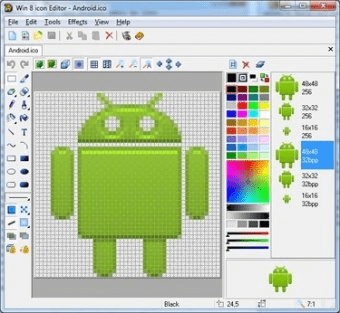
Win 8 Icon Editor provides great opportunities for working with Windows XP and Windows 8 icons. You will be able to handle 7/8 Icons with ease. In order to make Windows 8 icons compatible with Windows XP you can save them without any compression.
Win8 Icons introduce a new style of iconography that brings a higher level of detail and sophistication to Windows imagery. First, the style of Windows Metro icons is more realistic than illustrative, but not quite photorealistic. The icons are symbolic images - they should look better than photorealistic. Second, icons have a maximum size of 256 x 256, making them suitable for high-DPI displays. These high-resolution icons allow for high visual quality in list views with large icons. Finally, wherever practical, fixed document icons are replaced by thumbnails of the content, making documents easier to identify and find. Thus, Win 8 Icon Editor is a beeline to refining the visuals of your program and making it more communicative for users.
A picture of a maximum size of 256 x 256 to be used as an icon, in principle, is supported by XP, yet such an icon occupies 400Kb of disk space, which is far more than standard 25Kb of an XP icon. Aha-Soft has again found a way to cast off these shackles: Win 8 Icon Editor uses advanced PNG compression to save images without losses and supports semitransparent images with 8bit alpha channel. That technology reduces the size of an icon only, leaving the quality invariable. More
Details
Extensions

No information available
The data will be available later.Old versions

No information available
The data will be available later.


Comments